

All Models
All Endpoints
Multi-SDK Support
Quick Start
Get OpenAI working in 3 steps:provider="@openai" in Portkey() and use just model="gpt-4o" in the request.Legacy support: The virtual_key parameter still works for backwards compatibility.Add Provider in Model Catalog
- Go to Model Catalog → Add Provider
- Select OpenAI
- Choose existing credentials or create new by entering your OpenAI API key
- (Optional) Add your OpenAI Organization ID and Project ID for better cost tracking
- Name your provider (e.g.,
openai-prod)
Complete Setup Guide →
Basic Usage
Streaming
Stream responses for real-time output in your applications:Advanced Features
Responses API
OpenAI’s Responses API combines the best of both Chat Completions and Assistants APIs. Portkey fully supports this API with both the Portkey SDK and OpenAI SDK.Remote MCP support on Responses API
Streaming with Responses API
Realtime API
Portkey supports OpenAI’s Realtime API with a seamless integration. This allows you to use Portkey’s logging, cost tracking, and guardrail features while using the Realtime API.Realtime API
Using Vision Models
Portkey’s multimodal Gateway fully supports OpenAI vision models as well. See this guide for more info:Vision with the Responses API
The Responses API also processes images alongside text:Function Calling
Function calls within your OpenAI or Portkey SDK operations remain standard. These logs will appear in Portkey, highlighting the utilized functions and their outputs. Additionally, you can define functions within your prompts and invoke theportkey.prompts.completions.create method as above.
Function Calling with the Responses API
The Responses API also supports function calling with the same powerful capabilities:Fine-Tuning
Please refer to our fine-tuning guides to take advantage of Portkey’s advanced continuous fine-tuning capabilities.Image Generation
Portkey supports multiple modalities for OpenAI. Make image generation requests through Portkey’s AI Gateway the same way as making completion calls.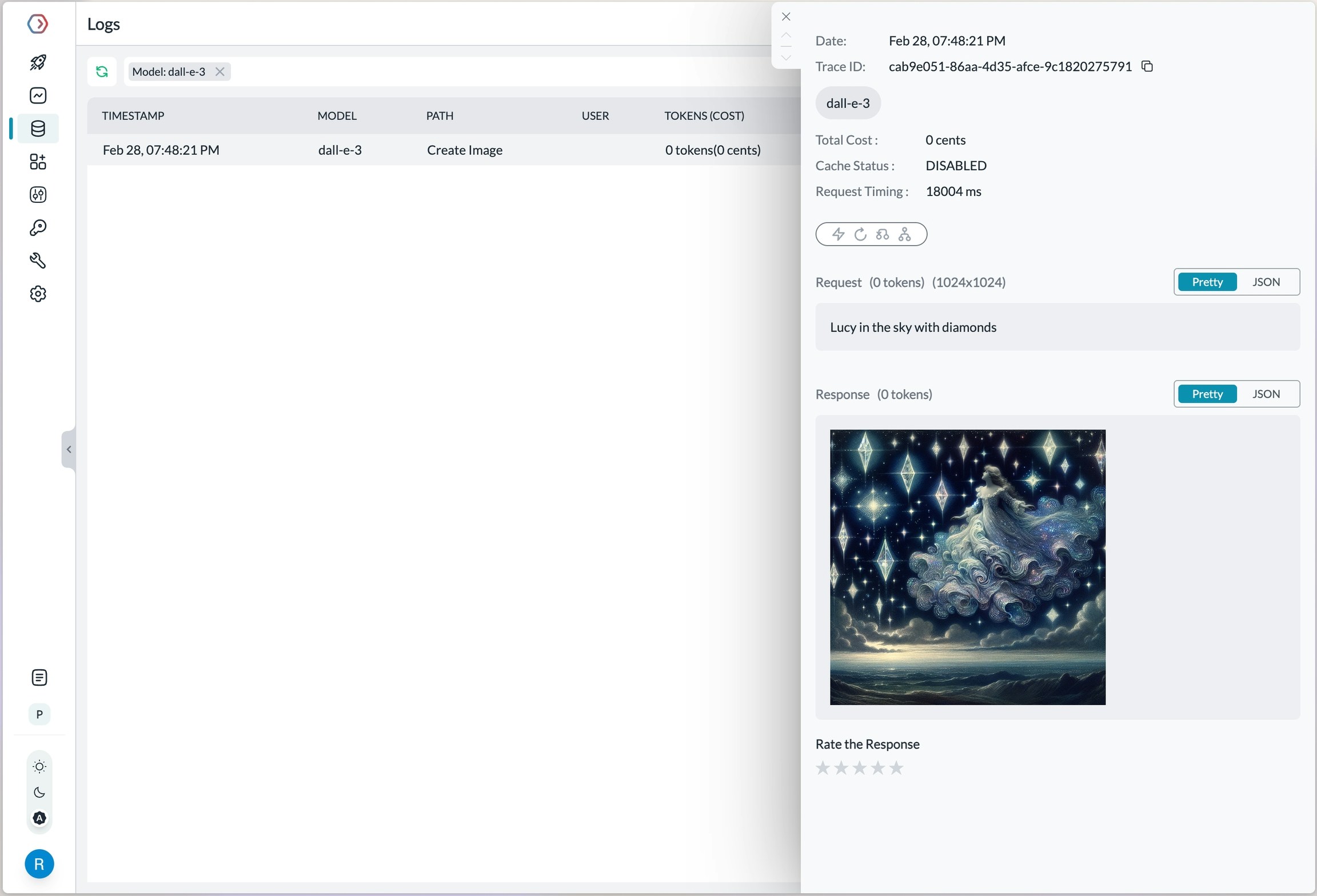
Log view for an image generation request on OpenAI
Video Generation with Sora
Portkey supports OpenAI’s Sora video generation models through the AI Gateway. Generate videos using the Portkey Python SDK:Audio - Transcription, Translation, and Text-to-Speech
Portkey’s multimodal Gateway also supports theaudio methods on OpenAI API. Check out the below guides for more info:
Check out the below guides for more info:
Integrated Tools with Responses API
Web Search Tool
Web search delivers accurate and clearly-cited answers from the web, using the same tool as search in ChatGPT:search_context_size:high: Most comprehensive context, higher cost, slower responsemedium: Balanced context, cost, and latency (default)low: Minimal context, lowest cost, fastest response
File Search Tool
File search enables quick retrieval from your knowledge base across multiple file types:Enhanced Reasoning
Control the depth of model reasoning for more comprehensive analysis:Computer Use Assistant
Portkey also supports the Computer Use Assistant (CUA) tool, which helps agents control computers or virtual machines through screenshots and actions. This feature is available for select developers as a research preview on premium tiers.Managing OpenAI Projects & Organizations in Portkey
When integrating OpenAI with Portkey, specify your OpenAI organization and project IDs along with your API key. This is particularly useful if you belong to multiple organizations or are accessing projects through a legacy user API key. Specifying the organization and project IDs helps you maintain better control over your access rules, usage, and costs. Add your Org & Project details using:- Adding in Model Catalog (Recommended)
- Defining a Gateway Config
- Passing Details in a Request
Using Model Catalog
When adding OpenAI from the Model Catalog, Portkey automatically displays optional fields for the organization ID and project ID alongside the API key field. Get your OpenAI API key from here, then add it to Portkey along with your org/project details.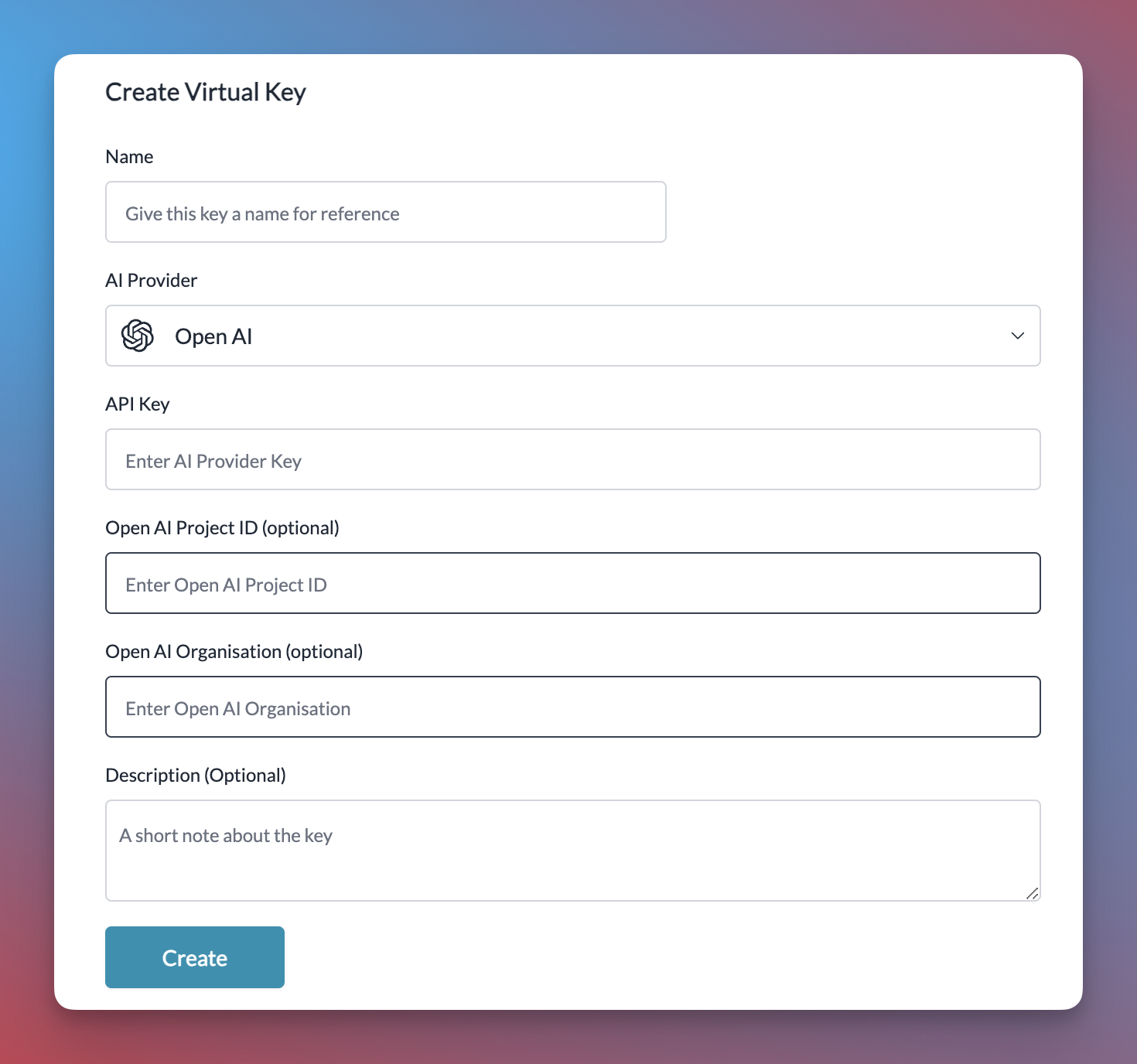
Using the Gateway Config
You can also specify the organization and project details in the gateway config, either at the root level or within a specific target.While Making a Request
You can also pass your organization and project details directly when making a request using curl, the OpenAI SDK, or the Portkey SDK.Limitations
Vision Model Limitations
- Medical images: Vision models are not suitable for interpreting specialized medical images like CT scans and shouldn’t be used for medical advice.
- Non-English: The models may not perform optimally when handling images with text of non-Latin alphabets, such as Japanese or Korean.
- Small text: Enlarge text within the image to improve readability, but avoid cropping important details.
- Rotation: The models may misinterpret rotated / upside-down text or images.
- Visual elements: The models may struggle to understand graphs or text where colors or styles like solid, dashed, or dotted lines vary.
- Spatial reasoning: The models struggle with tasks requiring precise spatial localization, such as identifying chess positions.
- Accuracy: The models may generate incorrect descriptions or captions in certain scenarios.
- Image shape: The models struggle with panoramic and fisheye images.
- Metadata and resizing: The models do not process original file names or metadata, and images are resized before analysis, affecting their original dimensions.
- Counting: May give approximate counts for objects in images.
- CAPTCHAS: For safety reasons, CAPTCHA submissions are blocked by OpenAI.
Image Generation Limitations
- DALL·E 3 Restrictions:
- Only supports image generation (no editing or variations)
- Limited to one image per request
- Fixed size options: 1024x1024, 1024x1792, or 1792x1024 pixels
- Automatic prompt enhancement cannot be disabled
- Image Requirements:
- Must be PNG format
- Maximum file size: 4MB
- Must be square dimensions
- For edits/variations: input images must meet same requirements
- Content Restrictions:
- All prompts and images are filtered based on OpenAI’s content policy
- Violating content will return an error
- Edited areas must be described in full context, not just the edited portion
- Technical Limitations:
- Image URLs expire after 1 hour
- Image editing (inpainting) and variations only available in DALL·E 2
- Response format limited to URL or Base64 data
Speech-to-Text Limitations
- File Restrictions:
- Maximum file size: 25 MB
- Supported formats: mp3, mp4, mpeg, mpga, m4a, wav, webm
- No streaming support
- Language Limitations:
- Translation output available only in English
- Variable accuracy for non-listed languages
- Limited control over generated audio compared to other language models
- Technical Constraints:
- Prompt limited to first 244 tokens
- Restricted processing for longer audio files
- No real-time transcription support
Text-to-Speech Limitations
- Voice Restrictions:
- Limited to 6 pre-built voices (alloy, echo, fable, onyx, nova, shimmer)
- Voices optimized primarily for English
- No custom voice creation support
- No direct control over emotional range or tone
- Audio Quality Trade-offs:
- tts-1: Lower latency but potentially more static
- tts-1-hd: Higher quality but increased latency
- Quality differences may vary by listening device
- Usage Requirements:
- Must disclose AI-generated nature to end users
- Cannot create custom voice clones
- Performance varies for non-English languages
Frequently Asked Questions
General FAQs
Is it free to use the OpenAI API?
Is it free to use the OpenAI API?
I am getting rate limited on OpenAI API
I am getting rate limited on OpenAI API
Vision FAQs
Can I fine-tune OpenAI models on vision requests?
Can I fine-tune OpenAI models on vision requests?
Can I use gpt-4o or other chat models to generate images?
Can I use gpt-4o or other chat models to generate images?
What type of files can I upload for vision requests?
What type of files can I upload for vision requests?
For vision requests, is there a limit to the size of the image I can upload?
For vision requests, is there a limit to the size of the image I can upload?
How do rate limits work for vision requests?
How do rate limits work for vision requests?
Can models understand image metadata?
Can models understand image metadata?
Embedding FAQs
How can I tell how many tokens a string has before I embed it?
How can I tell how many tokens a string has before I embed it?
How can I retrieve K nearest embedding vectors quickly?
How can I retrieve K nearest embedding vectors quickly?
Do V3 embedding models know about recent events?
Do V3 embedding models know about recent events?
text-embedding-3-large & text-embedding-3-small) is September 2021 - so they do not know about the most recent events.Prompt Caching FAQs
How is data privacy maintained for caches?
How is data privacy maintained for caches?
Does Prompt Caching affect output token generation or the final response of the API?
Does Prompt Caching affect output token generation or the final response of the API?
Is there a way to manually clear the cache?
Is there a way to manually clear the cache?
Will I be expected to pay extra for writing to Prompt Caching?
Will I be expected to pay extra for writing to Prompt Caching?
Do cached prompts contribute to TPM rate limits?
Do cached prompts contribute to TPM rate limits?
Is discounting for Prompt Caching available on Scale Tier and the Batch API?
Is discounting for Prompt Caching available on Scale Tier and the Batch API?
Does Prompt Caching work on Zero Data Retention requests?
Does Prompt Caching work on Zero Data Retention requests?
Image Generation FAQs
What's the difference between DALL·E 2 and DALL·E 3?
What's the difference between DALL·E 2 and DALL·E 3?
How long do the generated image URLs last?
How long do the generated image URLs last?
What are the size requirements for uploading images?
What are the size requirements for uploading images?
Can I disable DALL·E 3's automatic prompt enhancement?
Can I disable DALL·E 3's automatic prompt enhancement?
How many images can I generate per request?
How many images can I generate per request?
What image formats are supported?
What image formats are supported?
How does image editing (inpainting) work?
How does image editing (inpainting) work?
Speech-to-Text FAQs
What audio file formats are supported?
What audio file formats are supported?
Can I translate audio to languages other than English?
Can I translate audio to languages other than English?
How do I handle audio files longer than 25 MB?
How do I handle audio files longer than 25 MB?
Does the API support all languages equally well?
Does the API support all languages equally well?
Can I get timestamps in the transcription?
Can I get timestamps in the transcription?
timestamp_granularities parameter, you can get timestamps at the segment level, word level, or both.How can I improve transcription accuracy for specific terms?
How can I improve transcription accuracy for specific terms?
What's the difference between transcription and translation?
What's the difference between transcription and translation?
Text-to-Speech FAQs
What are the differences between TTS-1 and TTS-1-HD models?
What are the differences between TTS-1 and TTS-1-HD models?
Which audio formats are supported?
Which audio formats are supported?
Can I create or clone custom voices?
Can I create or clone custom voices?
How well does it support non-English languages?
How well does it support non-English languages?
Can I control the emotional tone or style of the speech?
Can I control the emotional tone or style of the speech?
Is real-time streaming supported?
Is real-time streaming supported?
Do I need to disclose that the audio is AI-generated?
Do I need to disclose that the audio is AI-generated?