Portkey provides a robust and secure gateway to integrate various Large Language Models (LLMs) into applications, including Mistral AI’s models. With Portkey, take advantage of features like fast AI gateway access, observability, prompt management, and more, while securely managing API keys through Model Catalog.

Quick Start

Get Mistral AI working in 3 steps:
from portkey_ai import Portkey

# 1. Install: pip install portkey-ai
# 2. Add @mistral-ai provider in model catalog
# 3. Use it:

portkey = Portkey(api_key="PORTKEY_API_KEY")

response = portkey.chat.completions.create(
    model="@mistral-ai/mistral-large-latest",
    messages=[{"role": "user", "content": "Say this is a test"}]
)

print(response.choices[0].message.content)
Tip: You can also set provider="@mistral-ai" in Portkey() and use just model="mistral-large-latest" in the request.

Add Provider in Model Catalog

  1. Go to Model Catalog → Add Provider
  2. Select Mistral AI
  3. Choose existing credentials or create new by entering your Mistral AI API key
  4. Name your provider (e.g., mistral-ai-prod)

Complete Setup Guide →

See all setup options, code examples, and detailed instructions

Codestral Endpoint

Mistral AI provides a dedicated Codestral endpoint for code generation. Use the customHost property to access it:
from portkey_ai import Portkey

portkey = Portkey(
    api_key="PORTKEY_API_KEY",
    provider="@mistral-ai",
    custom_host="https://codestral.mistral.ai/v1"
)

code_completion = portkey.chat.completions.create(
    model="codestral-latest",
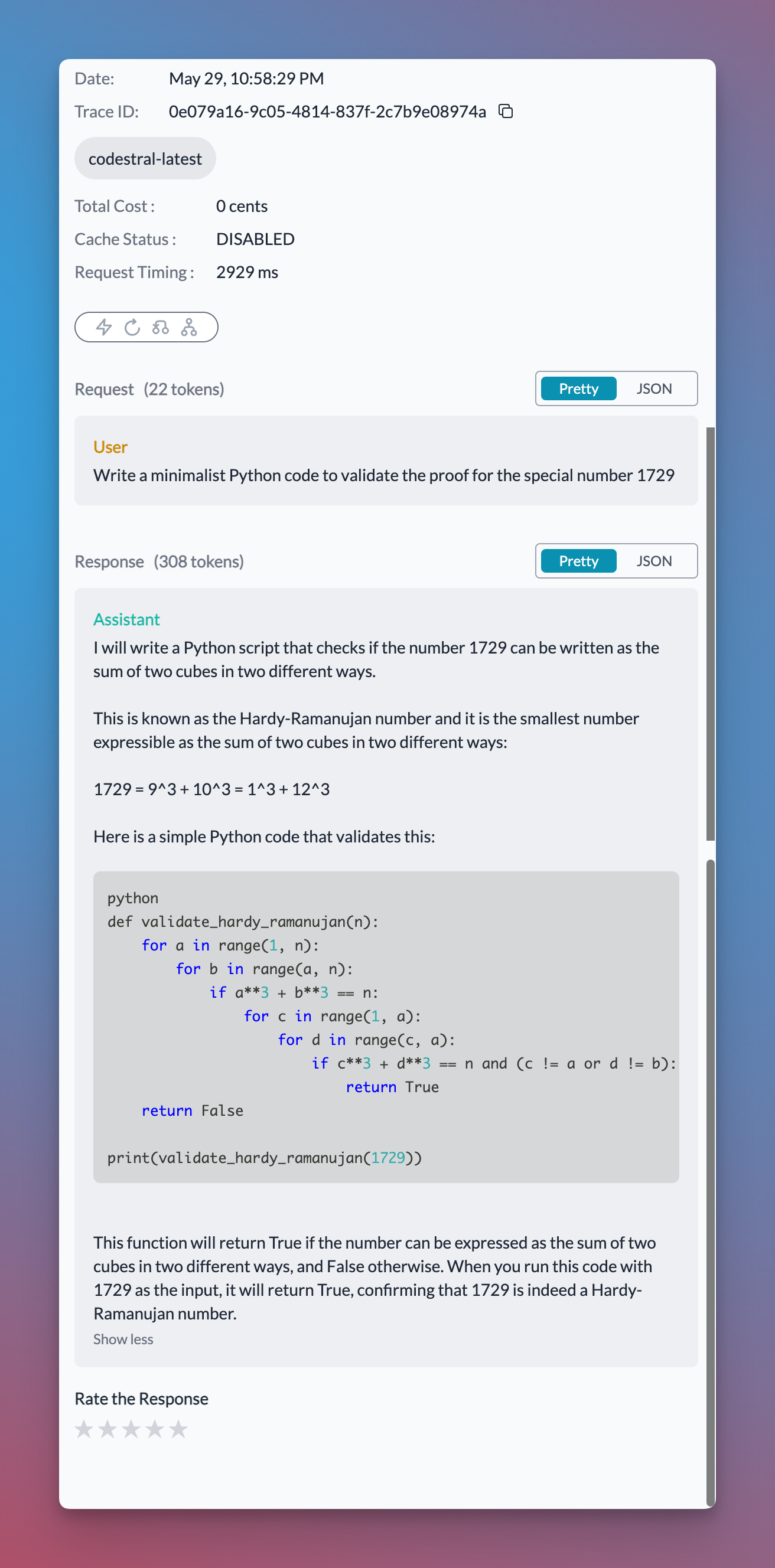
    messages=[{"role": "user", "content": "Write a minimalist Python code to validate the proof for the special number 1729"}]
)

print(code_completion.choices[0].message.content)
Your Codestral requests will show up on Portkey logs with code snippets rendered beautifully:

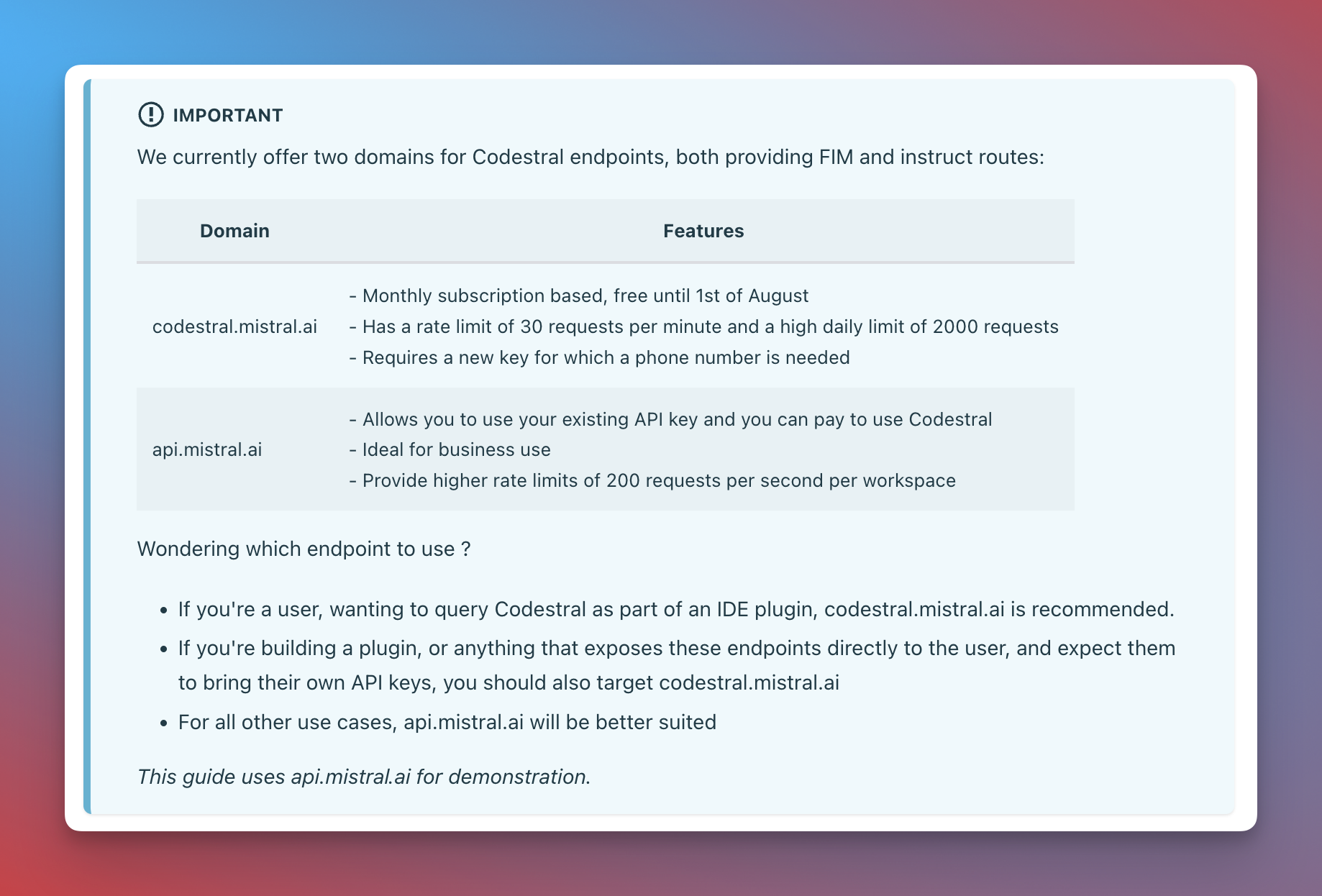
Codestral vs Mistral API Endpoint

Here’s a guide for when to use the Codestral endpoint vs the standard Mistral API endpoint:
For more, check out Mistral’s Code Generation guide

Mistral Tool Calling

Tool calling lets models trigger external tools based on conversation context. You define available functions, the model chooses when to use them, and your application executes them and returns results. Portkey supports Mistral tool calling and makes it interoperable across multiple providers. With Portkey Prompts, you can templatize your prompts and tool schemas.
from portkey_ai import Portkey

portkey = Portkey(
    api_key="PORTKEY_API_KEY",
    provider="@mistral-ai"
)

tools = [{
    "type": "function",
    "function": {
        "name": "getWeather",
        "description": "Get the current weather",
        "parameters": {
            "type": "object",
            "properties": {
                "location": {"type": "string", "description": "City and state"},
                "unit": {"type": "string", "enum": ["celsius", "fahrenheit"]}
            },
            "required": ["location"]
        }
    }
}]

response = portkey.chat.completions.create(
    model="mistral-large-latest",
    messages=[
        {"role": "system", "content": "You are a helpful assistant."},
        {"role": "user", "content": "What's the weather like in Delhi?"}
    ],
    tools=tools,
    tool_choice="auto"
)

print(response.choices[0].finish_reason)

Managing Mistral AI Prompts

Manage all prompt templates to Mistral AI in the Prompt Library. All current Mistral AI models are supported, and you can easily test different prompts. Use the portkey.prompts.completions.create interface to use the prompt in an application.

Next Steps

For complete SDK documentation:

SDK Reference

Complete Portkey SDK documentation